photoshop enhancements

Discuss, Discover, Learn, and Share. Feel free to share information.

Moderators: orrb, saw22

Steve Everist
Site Admin
Posts: 551
Joined: Sun Jul 03, 2005 4:27 pm
Location: Bellevue, WA

Re: photoshop enhancements

Post by Steve Everist »

antonroland wrote:This is one seriously thought-provoking thread.

It is further my opinion that the photoshop history tool is limited in how many transactions it will store and so proper documentation is invaluable. Tools in different sequences also give different results and so, again, proper documentation is essential.
Are you talking about the History Tracker that's set through in PS preferences? I'm not aware that there is a limit to the number of steps it will keep. Here's a screen grab of one of my history windows - you can see by the size of the slider that there are a lot of steps saved:
Image
Steve E.
antonroland
Posts: 253
Joined: Fri Feb 01, 2008 5:20 am
Location: Port Elizabeth, South Africa

Re: photoshop enhancements

Post by antonroland »

Steve Everist wrote:
antonroland wrote:This is one seriously thought-provoking thread.

It is further my opinion that the photoshop history tool is limited in how many transactions it will store and so proper documentation is invaluable. Tools in different sequences also give different results and so, again, proper documentation is essential.
Are you talking about the History Tracker that's set through in PS preferences? I'm not aware that there is a limit to the number of steps it will keep. Here's a screen grab of one of my history windows - you can see by the size of the slider that there are a lot of steps saved:
Image

I was referring to the history palette. Obviously a corner in PS I do not know about yet then. Where is this found?

I had a look under Edit>Preferences but do not find anything that I understand that looks like a history tracker?

Thanks
Make a difference day by day, case by case. If you don't make a difference you don't count.
Peter Griffin
Posts: 74
Joined: Mon Apr 30, 2007 3:15 pm
Location: Quahog. RI

Re: photoshop enhancements

Post by Peter Griffin »

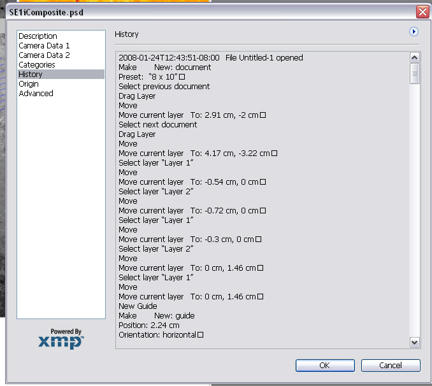
You can turn your history log on by going to:
Edit-->Preferences-->General

With an image open you can view your history log by going to:
File-->File Info


PG
George Reis
Posts: 147
Joined: Wed Jul 27, 2005 1:00 pm
Location: Orange County, CA - USA
Contact:

Re: photoshop enhancements

Post by George Reis »

The courts do not have a requirement about the level of documentation we keep related to our imaging workflow, so it is up to each of us to determine if we document, and to what level we document. For me, the main issue is repeatability. I want to be able to make the same adjustment and obtain the same result. If I just make a basic brightness/contrast adjustment (which I always to the same way), documentation becomes much less important than if I use the channel mixer, deconvolution, FFT, or make local adjustments.

The History Log is a great feature in Photoshop, but it should be noted that if you run actions in Batch mode, it doesn't record that actions were even run. If you run an action on an open image, the name of the action is recorded, but not the steps of the action. Freehand tools (dodge, burn, brush, pencil, lasso, etc.) don't record their paths (the pen tool for making vector paths is an exception). As such, I suggest that if you plan on taking advantage of the History Log, that you know what is and isn't recorded so that you're not caught by surprise in the future.

My work-around regarding the lack of recording of actions is to save copies of the actions used with my processed images. I have a script that pretty much automates this, and will gladly send it to anyone who contacts me off-list.

My work-around regarding the non-recording of freehand tools is to not use freehand tools.

George
I can resist anything except temptation - Oscar Wilde
mdavis
Posts: 154
Joined: Mon Jan 02, 2006 6:07 am
Contact:

Re: photoshop enhancements

Post by mdavis »

The use of the history log (not the history pallet) is a new suggestion based upon its recent inclusion in (I think) Photoshop CS2 or CS3. If you are using an older version of Photoshop, it won't be there. We used to use Actions as a recording device to track and then replay them in court if necessary to re-generate the final enhanced image from the original, and that is still a good practice.

The problem with using these recording features is that, quite often we experiment with curves, channels, blending modes and other "color filter" equivalents to reach a final, optimized result. If we use the "Undo" command many times to compare methods, for example, the history using any method can be a convoluted mess of trial and error. This can be extremely confusing to (especially) non-Photoshop users if viewed or re-created during a demonstration. My solution is to arrive at a suitable final image and then return to the original and record the optimal path through the maze.

I agree with an earlier comment that any of the Photoshop functions should be fair game provided that they are recorded, that they do not include the use of eraser or clone tools, and they seek only to enhance the existing image in which we are interested (the latent print). It is possible to minimize or even eliminate a colored background behind a black powder-dusted latent print by the use of channels, calculations, blending modes, etc. but such "removal" should not be disallowed based on arbitrary exclusionary language against removal of "detail."
ppx
Posts: 2
Joined: Thu Jul 10, 2008 10:04 am

Re: photoshop enhancements

Post by ppx »

Concerning the "History Log" function: we always use it as metadata/detailed. It provides the user a good documented log of all changes made to the image. Important remark: we never use actions while editing images. Even turning it off is logged. The "both" setting (metadata + txt file) is not used because the txt setting has the disadavantage that ALL history logs of every image you edit are kept in ONE text file. Metadata setting however keeps the History Log for each individual file seperately.

In Photoshop I made a simple action button which opens the General Preferences window (Ctrl+K) so that the "unexperienced' user can immediatly check if History Log is active (this means: Metadata detailed).

The use of Camera Raw files as "digital negative" (in combination with the conversion to DNG + embedded raw) and the History Log function in CS, provides me with a tool which enables me to explain in court to the jury or judge how a given digital result was obtained. Step by step.

ps. Another shortcut to view the History Log is "Alt+Ctrl+Shft+I".


Peter.
lloydthomas
Posts: 11
Joined: Tue Jul 05, 2005 6:44 am
Location: Devon & Cornwall Police, UK
Contact:

Re: photoshop enhancements

Post by lloydthomas »

But, there may be some instances where warping an image is a legitimate method. One example is in correcting pixel aspect ratio in video files. Another may be in correcting perspective distortion in a footwear, blood spatter, or fingerprint image.
I agree, particularly with regard to a fingerprint image. Here's an example:

You have a photograph of a latent on a curved surface and you were unable to lift the latent off that surface, e.g., a latent in blood on a small drinking glass. You want to take that photographed latent and enter it into AFIS but you feel that there is little chance of getting a hit because of the distortion due to it being on a curved surface.
However, with a degree of "artistic skill" you could "un-curve" the latent and get a better representation of how it would ordinarily appear on a flat surface, thereby increasing your chances of getting a hit - from "no chance" to "a fighting chance"!
Actually, Sagem Morpho have a tool on their AFIS system that does exactly that to latents found on curved surfaces, and that is what it is - just a "tool", the use of which can be explained in court should the issue come up. However, if we get a hit on the "warped" latent then obviously the determination as to identity/individualization is made using the original "un-warped" latent - the warping simply enabled us to locate the target.
Andrew Schriever
Posts: 72
Joined: Fri Jan 20, 2006 4:16 pm
Location: Las Vegas

Re: photoshop enhancements

Post by Andrew Schriever »

With Photoshop CS3 and some of the plug in filters available now, I dont rely on the history log at all to record the majority of my image processing. By using adjustment layers, smart filters, or plug in filters that record the parameters of the adjustment in the name of the layer; you can achieve a completely repeatable and transparent workflow. You never have to go into the history log to try and decipher what you have done to an image, its all laid out there simply and effectively in the layers palette.
Post Reply